Reference Websites
Multithreading - Java Tutorial - Liao Xuefeng’s Official Website
Mostly referenced Mr. Liao’s blog, a very good tutorial.
Detailed Illustration of Java Multithreading - Personal Article - SegmentFault
Relatively less detailed; covers synchronization locks and thread pools. Concise and clear.
Also supplemented some knowledge, such as thread status, synchronized locks, the producer-consumer model, etc.
Java Multithreading
Process/Thread
The relationship between processes and threads: A process can contain one or multiple threads, but there is always at least one thread.
The smallest execution unit scheduled by the operating system is actually a thread, not a process. Commonly used operating systems like Windows and Linux utilize preemptive multitasking. How a thread is scheduled is entirely determined by the OS; the program itself cannot decide when or for how long a thread executes.
Multitasking can be achieved by multi-processing, multi-threading within a single process, or a mix of multi-processing + multi-threading.
Compared to multi-threading, the disadvantages of multi-processing are:
- Creating a process incurs more overhead than creating a thread, especially on Windows systems.
- Inter-process communication is slower than inter-thread communication, as inter-thread communication merely involves reading and writing the same variables, which is extremely fast.
The advantages of multi-processing are:
- Multi-processing has higher stability than multi-threading. In a multi-process scenario, the crash of one process does not affect others.
- In a multi-threading scenario, the crash of any single thread directly causes the crash of the entire process.
Multithreading
The Java language has built-in support for multithreading: a Java program is actually a JVM process. The JVM process uses a main thread to execute the main() method, and within the main() method, we can start multiple threads. Furthermore, the JVM has other worker threads responsible for garbage collection, etc.
Compared to single-threaded programming, the characteristic of multithreaded programming is: multithreading often requires reading and writing shared data, which requires synchronization.
For instance, when playing a movie, one thread must play the video and another the audio. The two threads must coordinate their execution, otherwise, the imagery and audio will be out of sync. Therefore, multithreaded programming is highly complex and more difficult to debug.
Creating Multithreading
Creating a New Thread - Java Tutorial - Liao Xuefeng’s Official Website
Creating a new thread is very easy; we need to instantiate a Thread object, and then call its start() method:
| |
To have the new thread execute specified code, there are several methods:
Method 1: Derive a custom class from Thread and then override the run() method:
| |
When executing the above code, notice that the start() method will automatically invoke the instance’s run() method internally.
Method 2: When creating a Thread instance, pass in a Runnable instance.
| |
Or further simplify it using the lambda syntax introduced in Java 8:
| |
However, directly calling the run() method does not achieve multithreading, the current thread will not change; it merely executes the run() method.
You must call the
start()method of theThreadinstance to start a new thread. If we look at the source code of theThreadclass, we see that thestart()method internally invokes aprivate native void start0()method. Thenativemodifier indicates that this method is implemented by C code inside the JVM virtual machine, not by Java code.
The difference between using a thread and executing directly in the main() method:
| |
Execution order in main:
- Print
main start... - Create
Threadobject startinvokes the new threadWhen the
start()method is called, the JVM creates a new thread. We represent this new thread object using the instance variabletand start execution.- Print
main end...
However, after thread t starts running, main and t run concurrently. At this point, the program itself cannot determine the scheduling order of the threads.
To simulate the effect of concurrent execution, we can call Thread.sleep() in the thread. The parameter unit is milliseconds. sleep() forces the current thread to pause for a while:
| |
Thread Priority
| |
The JVM automatically maps priorities from 1 (lowest) to 10 (highest) to the actual priorities of the OS (different operating systems have different numbers of priority levels). Threads with higher priority are more likely to be scheduled by the OS. The OS might schedule high-priority threads more frequently, but we must never rely on setting priority to guarantee that a high-priority thread executes first. When the CPU is busy, threads with higher priorities acquire more time slices; when the CPU is idle, setting priorities is essentially useless.
The yield() method makes the running thread switch to the ready state, re-contending for the CPU’s time slice. Whether it gets the time slice when contending depends on the CPU’s allocation.
| |
| |
As the results above display, since thread t2 executed yield() every time it ran, the execution opportunities for thread 1 were noticeably more numerous than for thread 2.
Summary
- Java uses a
Threadobject to represent a thread and starts a new thread by callingstart(). - A thread object can only call the
start()method once. - The execution code of a thread is written in the
run()method. - Thread scheduling is determined by the OS; the program itself cannot dictate the scheduling sequence.
Thread.sleep()can pause the current thread for a duration.
Thread Blocking
The ways a thread can be placed into a blocking state are as follows:
- BIO blocking, i.e., using blocking IO streams.
sleep(long time)forces the thread to sleep, entering the block state.a.join()invoking thread enters blocking and awaits threadato finish execution before resuming.synchronizedorReentrantLockcauses a thread to enter the blocking state if it cannot acquire the lock.- Calling the
wait()method after acquiring a lock also forces the thread into a blocking state. LockSupport.park()places the thread in a blocking state.
Thread.sleep()
Makes a thread sleep, putting a running thread into a blocked state. When the sleep duration ends, the thread re-contends for the CPU’s time slice to resume execution.
| |
Thread.join()
A thread can also wait for another thread until it concludes its execution. For example, after initiating thread t, the main thread can utilize t.join() to await thread t concluding before continuing to run:
| |
When the main thread calls join() on thread object t, the main thread will wait until thread t finishes execution, and only then continue running its own subsequent code. Therefore, the print order of the code above is guaranteed: the main thread prints start first, thread t then prints hello, and finally the main thread prints end.
If thread t has already finished, calling join() on instance t returns immediately. Additionally, the overloaded method join(long) allows you to specify a maximum wait time, after which the thread stops waiting.
Summary
- Common ways to block a thread: BIO blocking,
sleep(),join(), failing to acquire a lock (synchronized/ReentrantLock),wait(),LockSupport.park(). sleep(): Makes the thread sleep for a specified duration. It can be interrupted during sleep. UsingTimeUnitis recommended for better readability.join(): Makes the current thread wait until the target thread finishes execution. Commonly used to control the order of thread execution.- Blocking and resumption: Once a thread enters a blocked state, it must wait for a specific condition to be met (e.g., sleep time elapsed, lock released, target thread completed) before it can resume execution.
Interrupting a Thread
Interrupting a Thread - Java Tutorial - Liao Xuefeng’s Official Website
If a thread needs to execute a long-running task, it may become necessary to interrupt it. Interrupting a thread means that another thread sends it a signal. Upon receiving this signal, the target thread exits its run() method, allowing it to terminate immediately.
For example, when downloading a 100M file from the network, if the connection is slow and the user clicks ‘Cancel’, the program must interrupt the downloading thread.
Thread.interrupt
Interrupting a thread is very simple; you just need another thread to call the interrupt() method on the target thread. The target thread needs to repeatedly check whether its state is interrupted, and if so, it must terminate its execution immediately.
| |
In the code above, the main thread interrupts thread t by calling t.interrupt(). However, note that the interrupt() method only sends an ‘interrupt request’ to thread t. As for whether thread t can respond immediately, it depends on its code. Since the while loop of thread t detects isInterrupted(), the code above correctly responds to the interrupt() request, allowing the run() method to conclude.
If the thread is in a waiting state—for example, t.join() places the main thread in a waiting state—then if interrupt() is called on the main thread, the join() method will immediately throw an InterruptedException. Therefore, as long as the target thread catches the InterruptedException thrown by the join() method, it implies that another thread has called the interrupt() method on it, and typically the thread should immediately exit.
| |
- The
mainthread notifies threadtto interrupt by callingt.interrupt(). - At this point, thread
tis waiting insidehello.join(); this method immediately stops waiting and throws anInterruptedException. - Inside thread
t, theInterruptedExceptionis caught, preparing the thread to terminate. - Before thread
tterminates, it also callsinterrupt()on thehellothread to notify it to interrupt.
The running Flag
Another common method to interrupt a thread is setting a flag. We normally use a running flag to indicate whether the thread should continue executing. By setting HelloThread.running to false from an external thread, we can make the thread terminate:
| |
Notice that the flag boolean running of HelloThread is a variable shared between threads. Shared variables between threads need to be marked with the volatile keyword to ensure that every thread can read the updated value of the variable.
The Purpose of volatile
Why declare variables shared across threads with the keyword volatile? This relates to Java’s memory model. Inside the Java virtual machine, variable values are stored in main memory. However, when a thread accesses a variable, it first obtains a copy and saves it in its own working memory. If a thread modifies the value of a variable, the virtual machine will write the modified value back to main memory at some point, but this timing is uncertain!
| |
This causes a situation where if one thread updates a certain variable, the value read by another thread might still be the one before the update.
For example, if the variable in main memory is a = true, when Thread 1 executes a = false, it merely changes its copy of variable a to false at that moment; the variable a in main memory is still true. Before the JVM writes the modified a back to main memory, the value of a read by other threads remains true, which leads to inconsistency in shared variables among multiple threads.
Therefore, the purpose of the volatile keyword is to tell the virtual machine:
- Every time you access a variable, always acquire the latest value from main memory;
- Every time you modify a variable, instantly write it back to main memory.
The volatile keyword solves the visibility problem: when one thread modifies the value of a shared variable, other threads can immediately see the modified value.
If we remove the volatile keyword and run the program above, we find the effect is similar to having volatile. This is because, under the x86 architecture, the JVM writes back to main memory extremely fast, but switching to an ARM architecture would incur significant delays.
Summary
- Calling
interrupt()on a target thread sends an interruption request. The target thread checks its status viaisInterrupted(). If the target thread is in a waiting state, it will catch anInterruptedException. - A target thread should terminate immediately when
isInterrupted()returnstrueor when it catches anInterruptedException. - When using flag-based approaches to control threads, the
volatilekeyword must be applied correctly. - The
volatilekeyword solves the visibility problem of shared variables across threads.
Thread State
Detailed Illustration of Java Multithreading - Personal Article - SegmentFault
Thread State - Java Tutorial - Liao Xuefeng’s Official Website
The System - Five States
Thread states can be divided into five states at the operating system level:

- Initial state: The state when the thread object is created.
- Runnable state (Ready state): After calling the
start()method, it enters the ready state, which implies it’s prepared to be scheduled and executed by the CPU. - Running state: The thread obtains the CPU’s time slice and executes the logic of the
run()method. - Blocked state: The thread is blocked, relinquishing the CPU’s time slice, and waits for the block to be lifted to return to the ready state and contend for a time slice again.
- Terminated state: The state after the thread has finished execution or thrown an exception.
Java - Six States
In a Java program, a thread object can only call the start() method once to initiate a new thread, and it executes the run() method within the new thread. Once the run() method finishes executing, the thread concludes. Hence, the states of a Java thread are as follows:
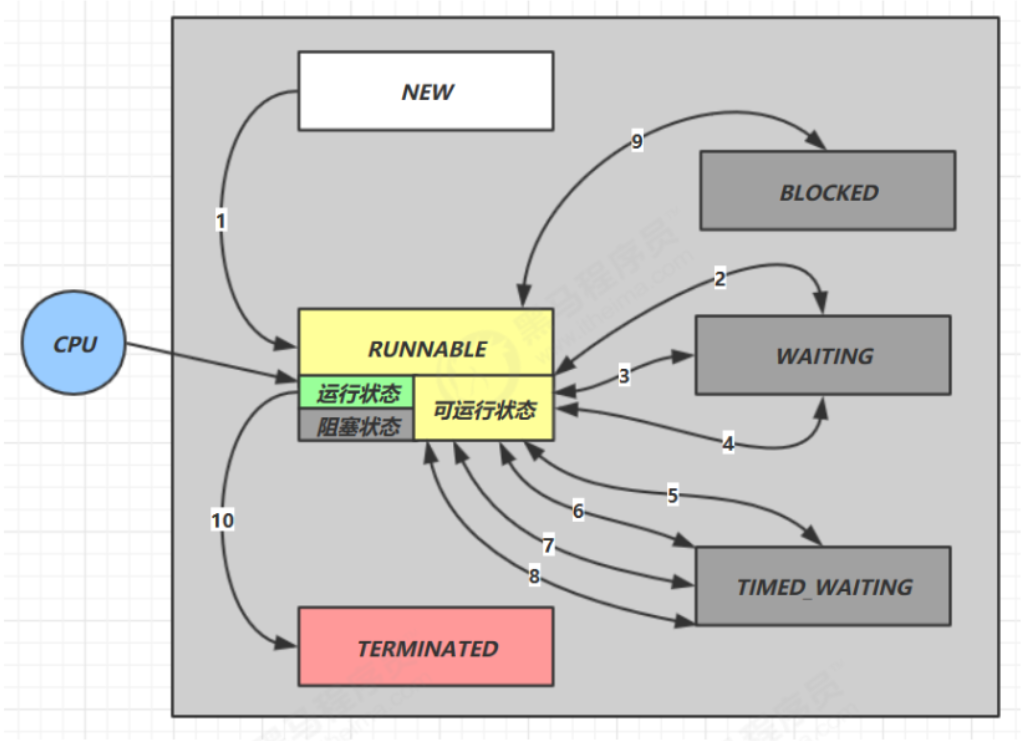
- NEW: The thread object is created.
- Runnable: The thread enters this state after calling the
start()method. This state encompasses three scenarios:- Ready state: Waiting for the CPU to allocate a time slice.
- Running state: Entering the Runnable method to execute a task.
- Blocked state: State during BIO execution of blocking IO streams.
- Blocked: The blocked state when failing to acquire a lock (will be detailed in the synchronization lock section).
- WAITING: The state after calling methods like
wait()orjoin(). - TIMED_WAITING: The state after calling methods like
sleep(time),wait(time), orjoin(time). - TERMINATED: The state after the thread has finished executing or thrown an exception.

After a thread starts, it can switch among the Runnable, Blocked, Waiting, and Timed Waiting states until it finally transitions to the Terminated state, at which point the thread terminates.
The reasons for a thread to terminate include:
- Normal termination: The
run()method executes and returns at thereturnstatement; - Unexpected termination: The
run()method terminates due to an uncaught exception; - Forceful termination: Calling the
stop()method on a specificThreadinstance (strongly discouraged).
Core Methods in the Thread Class
| Method Name | Is Static | Description |
|---|---|---|
| start() | No | Starts the thread, entering the ready state to await the CPU allocating a time slice. |
| run() | No | The method overriding the Runnable interface, representing the specific logic executed when the thread receives a CPU time slice. |
| yield() | Yes | Thread concession. Forces the thread holding the CPU time slice to enter the ready state to recompete for a time slice. |
| sleep(time) | Yes | The thread sleeps for a fixed period and enters a blocked state. Once the sleep duration completes, it recompetes for a time slice. Sleeping can be interrupted. |
| join()/join(time) | No | Calling the join method on a thread object forces the calling thread into a blocked state. It waits until the thread object finishes executing or reaches the designated time limit before recovering and re-contending for a time slice. |
| isInterrupted() | No | Retrieves the thread’s interruption flag: true for interrupted, false for uninterrupted. Calling this will not modify the interruption flag. |
| interrupt() | No | Interrupts the thread. Methods throwing an InterruptedException can all be interrupted; however, after interruption, the flag will not be modified. If a normally executing thread is interrupted, the interruption flag will be modified. |
| interrupted() | No | Fetches the thread’s interrupted flag. Calling this clears the interruption flag. |
| stop() | No | Stops thread execution (Not recommended). |
| suspend() | No | Suspends thread (Not recommended). |
| resume() | No | Resumes thread execution (Not recommended). |
| currentThread() | Yes | Acquires the current thread. |
Thread-related methods in Object
| Method Name | Description |
|---|---|
| wait()/wait(long timeout) | Makes the thread that has acquired the lock enter a blocked state. |
| notify() | Randomly wakes up one thread that has been wait()-ed. |
| notifyAll(); | Wakes up all threads that have been wait()-ed so they can recompete for time slices. |
Daemon Threads
Daemon Threads - Java Tutorial - Liao Xuefeng’s Official Website
The Java program entry point involves the JVM launching the main thread, which can in turn launch other threads. When all threads have finished executing, the JVM exits, and the process ends.
If there is a thread that hasn’t exited, the JVM process will not exit. Therefore, it must be guaranteed that all threads can conclude promptly.
However, there is a type of thread whose purpose is looping unconditionally. For example, a thread that triggers a task on a timer:
| |
If this thread does not finish, the JVM process cannot end. The question is, who is responsible for closing this thread?
Often, such threads lack a designated manager to terminate them. However, when other threads have finished, the JVM process unequivocally must end. What can be done?
The answer is using a Daemon Thread.
A daemon thread refers to a thread that serves other threads. In the JVM, once all non-daemon threads have completed execution, regardless of whether daemon threads exist, the virtual machine will automatically exit.
Hence, when the JVM exits, it doesn’t need to care whether daemon threads have concluded.
How does one create a daemon thread? The method is identical to an ordinary thread; only, before calling the start() method, you call setDaemon(true) to mark the thread as a daemon thread:
| |
Inside a daemon thread, caution must be exercised when writing code: Daemon threads cannot hold any resources that require closing, such as opened files. This is because when the virtual machine exits, the daemon thread is afforded no opportunity to close the files, which will result in data loss.
Summary
Daemon threads are threads that serve other threads.
After all non-daemon threads have completed execution, the virtual machine exits, and daemon threads are consequently terminated.
Daemon threads cannot hold resources that require closure (e.g., opened files).
Thread Synchronization
Thread Synchronization - Java Tutorial - Liao Xuefeng’s Official Website
When multiple threads execute concurrently, the scheduling of threads is dictated by the operating system, and the program itself cannot control it. Consequently, there is a possibility for any thread to be paused by the OS at any instruction and then resume execution after a certain timeframe.
At this point, a problem emerges that doesn’t exist under single-threaded models: if multiple threads concurrently read and write to a shared variable, data inconsistency issues will arise.
Let’s look at an example:
| |
The code above is very simple. Two threads simultaneously perform operations on an int variable; one adds 1 ten thousand times, and the other subtracts 1 ten thousand times. Ultimately, the result should be 0. However, every time it runs, the actual result varies.
This is because when reading and writing a variable, to get the correct result, it must be guaranteed to be an atomic operation. Atomic operations are single operations or a sequence of operations that cannot be interrupted.
For example, regarding the statement:
| |
It appears to be a single statement, but in reality, it maps to 3 instructions:
| |
Suppose the value of n is 100. If two threads concurrently execute n = n + 1, the obtained result is highly likely not 102, but rather 101. The reason being:
| |
If Thread 1 is interrupted by the OS after executing ILOAD, and if Thread 2 is scheduled to run at that exact moment, the value it retrieves after executing ILOAD is still 100. Ultimately, after the ISTORE writes of both threads, the result becomes 101 instead of the anticipated 102.
This demonstrates that beneath the multithreaded model, to ensure logic exactness, when reading and writing shared variables, you must ensure a group of instructions are executed atomically: meaning when an individual thread is executing, other threads must wait:
synchronized Synchronization Lock
| |
Through lock and unlock operations, we ensure that the 3 instructions always execute within a single thread’s execution period, preventing other threads from entering this instruction region. Even if the executing thread is interrupted by the OS, other threads still cannot enter this region because they cannot acquire the lock. Only after the executing thread releases the lock can other threads acquire it and proceed. The code block between locking and unlocking is called a Critical Section. At any given time, at most one thread can execute within the critical section.
Evidently, ensuring the atomicity of a segment of code is achieved by acquiring and releasing a lock. A Java program uses the synchronized keyword to lock an object:
| |
synchronized guarantees that the code block can be executed by at most one thread at an arbitrary moment. We can rewrite the code above utilizing synchronized as follows:
| |
Observe the code:
| |
It indicates using the Counter.lock instance as a lock. When the two threads execute their respective synchronized(Counter.lock) { ... } code blocks, they must first acquire the lock before entering the code block. After execution concludes, the lock is automatically released at the end of the synchronized statement block. In this way, reading and writing the Counter.count variable simultaneously is impossible. No matter how many times the code above is run, the final result is always 0.
Using synchronized solves the problem of correct concurrent access to shared variables by multiple threads. However, its disadvantage is a performance drop, because synchronized code blocks cannot execute concurrently. Additionally, acquiring and releasing locks requires a certain amount of time, meaning synchronized reduces the program’s execution efficiency.
Let’s outline how to use synchronized:
- Identify the thread code blocks that modify shared variables;
- Choose a shared instance as a lock;
- Use
synchronized(lockObject) { ... }.
When using synchronized, you do not need to worry about exceptions being thrown. Because regardless of whether there is an exception or not, the lock will be released correctly at the end of synchronized:
| |
Moreover, multiple threads can concurrently obtain their respective locks simultaneously: because JVM only ensures that the same lock can only be acquired by one thread at any arbitrary moment, but two different locks can be acquired separately by two threads at the same time.
Therefore, when using synchronized, which lock is acquired is extremely important. If the lock object is incorrect, the code logic will be wrong.
Below is an example of employing two different locks to improve efficiency:
| |
Operations That Do Not Require synchronized
The JVM specification defines several atomic operations:
- Assignment of basic types (excluding
longanddouble), e.g.,int n = m; - Reference type assignment, e.g.,
List<String> list = anotherList.
long and double are 64-bit data. The JVM does not strictly specify whether 64-bit assignments are atomic, but on x64 platform JVMs, the assignments of long and double are implemented as atomic operations.
Statements with a single atomic operation do not require synchronization. For example:
| |
Does not require synchronization.
It’s similar for references. For example:
| |
The aforementioned assignment statement does not require synchronization.
However, if they are multi-line assignment statements, they must be guaranteed to be synchronized operations. For example:
| |
The read and write operations above, namely (set(), get()), need synchronization. If reading is unsynchronized, it will cause logical errors in the program:
| |
Suppose the current coordinates are (100, 200). Then, when setting the new coordinates to (110, 220), the values read multithreadedly by the aforementioned unsynchronized code might be:
- (100, 200): before updating x and y;
- (110, 200): after updating x, before updating y;
- (110, 220): after updating x and y.
If it reads (110, 200), i.e., having read the updated x but the pre-update y, there’s no guarantee the states of multiple read variables stay consistent.
Sometimes, through some clever transformations, non-atomic operations can be turned into atomic operations. For example, if the code above is rewritten as:
| |
Synchronization is no longer required because this.ps = ps is an atomic operation for reference assignment. Meanwhile, the statement:
| |
Here, ps is a local variable defined inside the method. Every thread will have its own individual local variables, unaffecting each other and remaining mutually invisible, hence demanding no synchronization.
Note, however, that the reading method still requires synchronization during the process of copying the int[] array.
Immutable Objects Do Not Require Synchronization
Immutable objects denote objects whose state cannot be altered after creation. In Java, typical immutable objects include:
String- Immutable collections created by
List.of()(Java 9+) - Wrapper classes for basic types (e.g.,
Integer,Long, etc.)
If multiple threads read from or write to an immutable object, synchronization isn’t necessary because the object’s state won’t be modified:
| |
Notice that the set() method internally created an immutable List. The objects incorporated in this List are also immutable String objects; therefore, the whole List<String> instance comprises immutability, making both reading and writing synchrony-free.
When analyzing whether a variable can be accessed concurrently by multiple threads, one must first clarify the concepts. What multiple threads execute simultaneously are methods. For the example below:
| |
If threads A and B exist, “executing simultaneously” signifies:
set()might execute simultaneously;get()might execute simultaneously;- A might execute
set()concurrently while B executesget().
The class member variables names, x, y clearly can be simultaneously read and written by multiple threads, but local variables (including method parameters) if not “escaped”, remain solely visible to the current thread. The local variable step is only used inside the set() method, therefore when every thread executes set(), it contains an independent storage of step in the thread’s stack, without mutual influence.
The local variable ns is also held separately by each thread, but the subsequent assignment this.names = ns turns it visible to other threads. If the set() method is synchronized, and you wish to minimize the synchronized code block, you can rewrite it as:
| |
Therefore, deeply understanding multithreading requires comprehending variable storage in the stack, as primitive types and reference types are stored differently.
| Scenario | Requires Sync | Reason |
|---|---|---|
Immutable object (e.g., List.of()) | No | Object immutable, multi-thread read-only, no race conditions. |
Local variable (e.g., step) | No | Thread private, confined to stack. |
Member variable assignment (e.g., this.names) | Yes | Reference could be modified simultaneously; needs sync or volatile. |
Compound ops (e.g., x += step) | Yes | Non-atomic operations (read-modify-write); needs sync. |
Summary
When multiple threads concurrently read and write shared variables, logical errors may occur; therefore, synchronization via synchronized is required.
The essence of synchronization is locking a specified object; only after acquiring the lock can the subsequent code execute.
Note that the lock object must be the same instance.
Single atomic operations defined by the JVM do not require synchronization.
Thread Synchronization Methods
Thread Safety
If a class is designed to permit multiple threads to access it correctly, we say this class is “thread-safe.” The java.lang.StringBuffer in the Java standard library is also thread-safe.
There are also some immutable classes, such as String, Integer, LocalDate, whose member variables are all final. Multiple threads can only read and cannot write when accessing them simultaneously. These immutable classes are also thread-safe.
Lastly, classes like Math that only provide static methods and have no member variables are also thread-safe.
Apart from the few exceptions mentioned above, most classes, such as ArrayList, are non-thread-safe classes. We cannot modify them in a multithreaded environment. However, if all threads only read and do not write, then ArrayList can be safely shared across threads.
Without specific elaboration, a class is non-thread-safe by default.
Take the Counter class below for example:
| |
This way, when a thread calls the add() and dec() methods, it doesn’t need to care about synchronization logic because the synchronized code block is inside the add() and dec() methods. Moreover, we notice that the object locked by synchronized is this, meaning the current instance, which again ensures that when multiple Counter instances are created, they do not influence each other and can execute concurrently.
The synchronized Modifier
Let’s observe the Counter code again:
| |
When what we lock is the this instance, we can actually use synchronized to modify the method. The following two approaches are equivalent:
| |
Approach two:
| |
Therefore, a method modified with synchronized is a synchronized method, which signifies that the entire method must be locked using the this instance.
For static methods, there is no this instance because static methods target the class rather than an instance. However, we note that any class has a Class instance automatically created by the JVM. Hence, adding synchronized to a static method locks the Class instance of that class. The aforementioned synchronized static method actually equates to:
| |
Summary
Using synchronized to modify a method can turn the entire method into a synchronized code block. The locking object for a synchronized method is this.
Through reasonable design and data encapsulation, a class can become “thread-safe”.
Unless otherwise stated, a class is not thread-safe by default.
Whether multiple threads can safely access a certain non-thread-safe instance requires analyzing the specific situation.
Deadlock
Reentrant Locks
Java’s thread locks are reentrant locks.
What is a reentrant lock? Let’s check out an example:
| |
Execution flow:
- Calling
add(-1):- Acquires the
thislock: counter = 1, holding thread = current thread.
- Acquires the
- Calls
dec(1)after entering theaddmethod:- Acquires the
thislock again: discovers it is already held by the current thread, counter increases to 2.
- Acquires the
- Exits the
decmethod:- Counter decreases to 1.
- Exits the
addmethod:- Counter decreases to 0, lock truly released.
Observe the add() method modified by synchronized. Once a thread executes inside the add() method, it implies that it has already obtained the this lock of the current instance. If the passed n < 0, the dec() method will be called inside the add() method. Because the dec() method also needs to acquire the this lock, a question arises:
For the same thread, is it possible to continue acquiring the same lock after having already acquired it?
The answer is affirmative. The JVM permits the same thread to repeatedly acquire the same lock. A lock that can be repeatedly acquired by the same thread is called a reentrant lock.
Since Java’s thread locks are reentrant locks, when acquiring a lock, it not only checks whether it is being acquired for the first time but also records the number of acquisitions. Each time the lock is acquired, the record is incremented by 1, and each time a synchronized block is exited, the record is decremented by 1. Only when the record decreases to 0 is the lock genuinely released.
Deadlock
A thread can acquire one lock and then proceed to acquire another lock. For example:
| |
When acquiring multiple locks, different threads acquiring locks of multiple distinct objects may induce a deadlock. For the code above, if thread 1 and thread 2 simultaneously execute the add() and dec() methods respectively:
- Thread 1: Enters
add(), obtainslockA; - Thread 2: Enters
dec(), obtainslockB.
Subsequently:
- Thread 1: Prepares to obtain
lockB, fails, waiting; - Thread 2: Prepares to obtain
lockA, fails, waiting.
At this point, the two threads each hold different locks and then attempt to acquire the lock held by the other, resulting in an infinite mutual wait. This is a deadlock.
After a deadlock occurs, there’s no mechanism to clear it; the JVM process can merely be forcefully terminated.
Hence, when writing multi-threaded applications, particular attention should be paid to guard against deadlock. Because once a deadlock forms, one can only forcefully terminate the process.
So how should we avoid deadlocks? The answer is: the order in which threads acquire locks must be consistent. Specifically, strictly follow the order of acquiring lockA first, then lockB. The rewritten dec() method is as follows:
| |
Summary
Java’s synchronized locks are reentrant locks.
Deadlock preconditions imply multiple threads each hold different locks and mutually attempt to retrieve the locks already held by the other, causing infinite waiting.
Avoiding deadlock relies on multiple threads acquiring locks in an identical order.
Thread Communication
In Java programs, synchronized resolves the problem of multithread competition. For instance, for a task manager, when multiple threads concurrently add tasks to a queue, synchronized can be used to apply locks:
| |
However, synchronized does not solve the coordination problem of multiple threads.
Still using the TaskQueue above as an example, let’s write another getTask() method to extract the first task from the queue:
| |
The code above seems faultless: getTask() initially checks whether the queue is empty internally. If it is empty, it waits in a loop until another thread inserts a task into the queue. The while() loop exits, and it can return the element from the queue.
However, the while() loop will never actually exit. Because when the thread executes the while() loop, it has already acquired the this lock at the entrance of getTask(). Other threads can’t possibly call addTask(), as executing addTask() also requires acquiring the this lock.
Therefore, executing the code above will cause the thread to 100% consume CPU resources inside getTask() due to an infinite loop.
If we think deeper, the execution effect we desire is:
- Thread 1 can call
addTask()to constantly add tasks to the queue; - Thread 2 can call
getTask()to fetch tasks from the queue. If the queue is empty,getTask()should wait until there is at least one task in the queue before returning.
Thus, the principle of multiple threads coordinating their execution is: when conditions are not met, the thread enters a waiting state; when conditions are met, the thread is awakened to continue executing tasks.
wait()
For the TaskQueue above, let’s first transform the getTask() method to make the thread enter a waiting state when conditions aren’t met:
| |
When a thread executes to the while loop interior of the getTask() method, it must have already acquired the this lock. At this point, the thread evaluates the while condition. If the condition holds true (queue is empty), the thread will execute this.wait(), entering a waiting state.
The key here is: the wait() method must be invoked on the lock object currently acquired. The lock acquired here is this, hence the call to this.wait().
After a thread invokes wait(), it enters a waiting state. The wait() method won’t return until a subsequent moment when the thread is awakened from its waiting state by another thread. After yielding to wait(), the thread continues processing the next statement.
Some diligent folks might point out: even if a thread rests inside getTask(), if other threads fail to snag the this lock, they still won’t be able to execute addTask(), what do we do?
The crux of this problem lies in the fact that the execution mechanism of wait() is highly complex. First, it’s not a regular Java method, but a native method defined in the Object class, meaning it is implemented by JVM’s C code. Secondly, the wait() method can only be invoked within a synchronized block, because when wait() is called, it will release the lock obtained by the thread. When wait() returns, the thread will again attempt to acquire the lock.
Therefore, the wait() method can only be invoked on the object lock. Because we acquired the this lock in getTask(), the wait() method can only be called on the this object.
| |
When a thread sleeps at this.wait(), it yields the this lock, enabling other threads to snare the this lock inside the addTask() method.
notify()
Now we face a second problem: how do we get the slumbering thread to be reawakened and then return from wait()? The answer is calling notify() on the same lock object. Let’s alter addTask() as follows:
| |
Notice that immediately after lodging a task into the queue, the thread instantly calls notify() on the this lock object. This method will awaken a thread that is presently sleeping on the this lock (which is the sequence suspended at this.wait() interior to getTask()), rendering the suspended thread capable of returning from this.wait().
Let’s scrutinize a full example (which is also a producer-consumer model):
| |
In this example, our focus is the addTask() method, which calls this.notifyAll() instead of this.notify(). Exerting notifyAll() awakens all threads presently lingering at the this lock, while notify() solely stirs one of them (which exact thread is contingent on the operating system, carrying explicit randomness). Because multiple threads might be waiting inside the wait() of the getTask() method, using notifyAll() will awaken them all at once. Usually speaking, notifyAll() is much safer. At times, if the logic lacks comprehensiveness, using notify() might lead to only one thread waking, while others might wait perpetually, never to wake.
Still, take heed that wait() necessitates reobtaining the this lock when it returns. Suppose 3 threads receive a wake-up signal; following the awakening, they must first wait for the thread executing addTask() to finish the method before the this lock is dropped. Subsequently, among these 3 threads, only one manages to grasp the this lock; the leftover two will plunge back into waiting.
Also observe how we deploy wait() within a while() loop rather than within an if block:
| |
This arrangement fundamentally harbors errors, since a thread necessitates reacquiring the this lock after awakening. Once several threads are spurred, merely one thread nabs the this lock. Currently this thread executing queue.remove() extracts elements correctly, however, when the remaining threads attain the this lock down the line and execute queue.remove(), the queue might no longer contain any elements. Therefore wait() should always reside in a while loop, and the lock must be rechecked explicitly upon acquisition.
| |
Summary
wait and notify are employed for multithread coordination:
- Within
synchronized, invokingwait()drives a thread into a waiting state; wait()must be triggered from an already held lock object;- Within
synchronized,notify()ornotifyAll()can be called to awaken other waiting threads; notify()ornotifyAll()must be triggered on an already-grasped lock object;- Awakened threads are still compelled to secure the lock anew before they proceed with execution.
Producer-Consumer Model
Java Producer Consumer Model Implementation and Analysis_bilibili
Below is a simple producer-consumer model example from Bilibili. Although it’s not as complex as the preceding thread communication example or the messaging queue example below, mastering these three examples should be sufficient to grasp this model.
| |
| |
The execution of threads carries a degree of randomness that users cannot completely control. However, the producer-consumer model can achieve the “alternating” execution of two threads.
The comments explain most of the logic. Let’s analyze it further:
Assume thread t1 is called first. Since sign = 0, it prints character 1 and changes sign to 1. From here, there are two possibilities: thread t1 or t2 is called next.
Calling t1:
sign = 1, enters thetry/catchblock.- Calls
this.wait()on the synchronization lock object, entering the “waiting” state. wait()will release the lock. Threadt2executes, runningconsume().notify()awakens threadt1currently waiting onthis.signis assigned 0, and the cycle repeats.
Calling t2:
- Thread
t2executes, runningconsume(). notify()does not awaken any thread (because no thread is in a waiting state).signis assigned 0, and the cycle repeats.
Example Analysis
Below is a more complex (and realistic) example. The concept is quite similar to the simple example above.
Let’s clarify the inline
lambdaexpression used to create a thread in the example below:
new Thread()- Creates a new thread() -> {...}- Lambda expression defining the thread task"Producer" + i- Thread naming.start()- Starts the thread
Here, threads are created using a loop, so the loop variable is used to name them.
| |
Main Function:
- Creates a
MessageQueuewith a capacity of 2. - Starts 3 producer threads. Each producer puts one message into the queue.
- The main thread sleeps for 1 second, giving producers enough time to start working.
- Starts a consumer thread that continuously extracts messages from the queue.
Producer:
- Uses a
synchronizedblock to acquire the lock for thelistobject. - Checks if the queue is full (using a
whileloop to prevent spurious wakeups). - If the queue is full, calls
wait()to release the lock and wait. - When there is free space in the queue, adds a message to the end of the queue.
- Calls
notifyAll()to wake up any consumer threads that might be waiting.
Consumer:
- Uses a
synchronizedblock to acquire the lock for thelistobject. - Checks if the queue is empty (using a
whileloop to prevent spurious wakeups). - If the queue is empty, calls
wait()to release the lock and wait. - When there are messages in the queue, retrieves a message from the head of the queue.
- Calls
notifyAll()to wake up any producer threads that might be waiting. - Returns the retrieved message.
Summary
- Synchronization Mechanism: Uses
synchronizedto ensure atomic operations on the queue. - Wait/Notify Mechanism: Uses
wait()andnotifyAll()to achieve inter-thread communication. - Loop Condition Check: Uses
whileinstead ofifto check conditions, preventing spurious wakeups. - Capacity Limits: Controls queue size to prevent memory exhaustion.
ReentrantLock
Starting with Java 5, an advanced java.util.concurrent package was introduced to handle concurrency. It provides numerous robust concurrent functionalities, greatly simplifying multi-threaded programming.
We know that Java natively provides the synchronized keyword for locking. However, this lock is somewhat heavy, and when trying to acquire it, threads must wait indefinitely without any mechanism to attempt locking and abort if failed.
The ReentrantLock offered by the java.util.concurrent.locks package serves as a substitute for synchronized locking. Let’s look at conventional synchronized code:
| |
If we replace it with ReentrantLock, we can modify the code as follows:
| |
Because synchronized is syntax provided directly at the Java language level, we don’t consider exceptions. But since ReentrantLock is a lock implemented in Java code, we must explicitly acquire the lock and then reliably release it within a finally block.
As the name implies, ReentrantLock is a reentrant lock. Like synchronized, a thread can acquire the same lock multiple times.
Unlike synchronized, ReentrantLock allows one to attempt acquiring a lock:
| |
In the code above, when trying to capture the lock, it waits up to 1 second. If the lock is still not obtained after 1 second, tryLock() returns false. This allows the program to handle it elegantly rather than waiting infinitely.
Therefore, using ReentrantLock is safer than raw synchronized; if a thread fails during tryLock(), it won’t lead to a deadlock.
Below, we introduce its various methods, along with a more complex example.
| |
| |
Process Analysis:
- Initialization:
- The main thread creates an
AwaitSignalobject, setting the number of loops to 5. - Three
Conditionobjects are created: a, b, c, corresponding respectively to three threads. - The three threads start, respectively calling
print("a", a, b),print("b", b, c), andprint("c", c, a). - After sleeping for 1 second, the main thread acquires the lock and wakes up thread A via
a.signal(). - After thread startup:
- Each thread enters the
printmethod and executeslock()to acquire the lock. BecauseReentrantLockis a mutual exclusion lock, only one thread can hold the lock at any given moment. - Assuming thread A acquires the lock first, it calls
a.await(), releasing the lock and entering a waiting state (waiting for the signal ofCondition a). - The other threads (B and C) attempt
lock(), but the lock is occupied, so they block onlock(). - Main thread wakes up thread A:
- After
try { Thread.sleep(1000); }, the main thread executesawaitSignal.lock(), acquiring the lock. - It calls
a.signal(), awakening thread A which is waiting onCondition a. - The main thread executes
unlock(), releasing the lock. - After thread A is awakened:
- Thread A returns from
a.await(), but it needs to reacquire the lock to continue execution. - Because the main thread has already released the lock (
unlock()), thread A successfully reacquires the lock. - Thread A prints “a”, then calls
b.signal()to wake up thread B. - Thread A executes
unlock(), releasing the lock. - After thread B is awakened:
- Thread B has been waiting on
b.await(), and is awakened after receivingb.signal(). - Thread B attempts to reacquire the lock. Since thread A has released the lock, thread B succeeds in acquiring the lock.
- Thread B prints “b”, calls
c.signal()to awaken thread C, and then releases the lock.
Summary
ReentrantLock can substitute for synchronized to perform synchronization operations.
Acquiring a lock with ReentrantLock is safer.
One must first acquire the lock before entering a try {...} code block, and finally use a finally block to guarantee the lock’s release.
You can use tryLock() to attempt acquiring a lock.
Thread Pool
(The explanations typically found regarding thread pools are rather vague.)
Although Java natively provides multithreading support and starting a new thread is very convenient, creating a thread inherently demands operating system resources (such as thread resources, stack space, etc.). The frequent creation and destruction of massive amounts of threads consume a tremendous amount of time.
What if we could reuse a set of threads:
| |
Then we can have a group of threads execute many small tasks, instead of creating a new thread for each task. This mechanism that accepts large numbers of small tasks and distributes them for processing is called a thread pool.
Simply put, a thread pool internally maintains a set of threads. When there are no tasks, these threads are in a waiting state. When a new task arrives, an idle thread is assigned to execute it. If all threads are busy, the new task is either placed in a queue to wait, or a new thread is created to handle it.
The Java standard library provides the ExecutorService interface representing thread pools, whose typical usage goes as follows:
| |
Since ExecutorService is just an interface, the Java standard library provides several common implementations:
- FixedThreadPool: A thread pool with a fixed number of threads;
- CachedThreadPool: A thread pool that dynamically adjusts its thread count based on the number of tasks;
- SingleThreadExecutor: A thread pool that uses only a single thread for execution.
The methods to create these thread pools are all encapsulated in the Executors class. Let’s use FixedThreadPool as an example to see how a thread pool executes:
| |
Looking at the execution results, when 6 tasks are submitted at once, only the first 4 tasks execute simultaneously because the thread pool has a fixed size of 4 threads. The remaining two tasks execute only after some threads become idle.
Thread pools must be shut down when the program terminates. When utilizing the shutdown() method to close a thread pool, it will wait for currently executing tasks to conclude prior to closing. shutdownNow() immediately halts operating tasks, whereas awaitTermination() will delay for a specified period for the thread pool to close sequentially.
If we switch to a CachedThreadPool, since this thread pool implementation dynamically adjusts its size based on the number of tasks, all 6 tasks can execute simultaneously.
What if we wish to confine the thread pool’s size to dynamically adjust between 4 and 10? We inspect the source code of the Executors.newCachedThreadPool() method:
| |
Thus, to construct a thread pool with a specified dynamic boundary range, we can draft it as:
| |
ScheduledThreadPool
There is another type of task that needs to be executed periodically, for example, refreshing stock prices every second. Such tasks that are fixed in nature and need to run repeatedly can use ScheduledThreadPool. Tasks placed in a ScheduledThreadPool can be executed on a recurring schedule.
Creating a ScheduledThreadPool is still done through the Executors class:
| |
We can submit a one-time task that will be executed once after a specified delay:
| |
If a task proceeds on a fixed 3-second routine consistently, we frame it as:
| |
If tasks execute consecutively spaced with fixed 3-second buffering intervals universally, we implement it as:
| |
Note the difference between FixedRate and FixedDelay:
FixedRate means that the task is always triggered at a fixed time interval, regardless of how long the task takes to execute:
| |
FixedDelay, on the other hand, means that after the previous task finishes executing, it waits for a fixed time interval before executing the next task:
| |
Therefore, when using a ScheduledThreadPool, we must choose whether to execute a task once, at a fixed rate (FixedRate), or with a fixed delay (FixedDelay), depending on our requirements.
You can also consider the following questions:
- In
FixedRatemode, assuming a task is triggered every second, if a particular execution takes longer than 1 second, will the subsequent tasks execute concurrently? - If a task throws an exception, will the subsequent tasks continue to execute?
The Java Standard Library also provides the java.util.Timer class, which can execute tasks periodically. However, a single Timer is backed by a single Thread. Because of this, one Timer can only execute one task periodically; to run multiple scheduled tasks, you must start multiple Timer instances. In contrast, a single ScheduledThreadPool can schedule multiple periodic tasks. Therefore, we can completely replace the legacy Timer class with ScheduledThreadPool.