References
Learn the knowledge and immediately have exercises to do.
Best viewing experience tutorial.
Relational Model
Quoted from 关系模型 - SQL教程 - 廖雪峰的官方网站
Primary Key
In a relational database, each row of data in a table is called a record. A record is composed of multiple fields. For example, two records in the students table:
| id | class id | name | gender | score |
|---|---|---|---|---|
| 1 | 1 | Xiaoming | M | 90 |
| 2 | 1 | Xiaohong | F | 95 |
For a relational table, there is a very important constraint: any two records cannot be duplicated. Non-duplication doesn’t mean two records are not entirely identical, but rather that different records can be uniquely distinguished by a certain field, and this field is called the primary key.
For example, assuming we use the name field as the primary key, then we can uniquely identify a record through the name Xiaoming or Xiaohong. However, with this setup, we couldn’t store students with the same name, because inserting two records with the same primary key is not allowed.
The most crucial requirement for a primary key is: once a record is inserted into the table, it’s best not to modify the primary key anymore, because the primary key is used to uniquely locate a record. Modifying the primary key will cause a series of cascading effects.
Because the role of the primary key is so important, how to select a primary key will have a significant impact on business development. If we use a student’s ID number as the primary key, it seems to uniquely locate a record. However, an ID number is also a business scenario. If the ID number’s length increases or needs to be changed, and as a primary key, it has to be modified, it will have a severe impact on the business.
Therefore, a basic principle for selecting a primary key is: do not use any business-related fields as the primary key.
Thus, fields that seem unique like ID numbers, mobile phone numbers, and email addresses, should not be used as primary keys.
The best primary key is a field completely unrelated to the business, and we generally name this field id. Common types suitable for the id field are:
- Auto-incrementing integer type: The database will automatically assign an auto-incrementing integer to each record upon insertion, so we don’t have to worry at all about primary key duplication, nor do we need to pre-generate the primary key ourselves;
- Globally Unique Identifier (GUID) type: Also known as UUID, using a globally unique string as a primary key, such as
8f55d96b-8acc-4636-8cb8-76bf8abc2f57. The GUID algorithm ensures that the strings generated by any computer at any time are different through network card MAC addresses, timestamps, and random numbers. Most programming languages have built-in GUID algorithms, allowing you to pre-calculate the primary key.
For most applications, an auto-incrementing primary key is usually sufficient. The primary key we defined in the students table is also of BIGINT NOT NULL AUTO_INCREMENT type.
If an INT auto-increment type is used, an error will occur when the number of records in a table exceeds 2,147,483,647 (about 2.1 billion) as it reaches the upper limit. Using the BIGINT auto-increment type allows for a maximum of about 9.22 quintillion records.
Summary
The primary key is the unique identifier for a record in a relational table. Selecting a primary key is very important: a primary key should not have any business meaning, and should instead use a BIGINT auto-increment or GUID type. A primary key should also not allow NULL.
Multiple columns can be used as a composite primary key, but composite primary keys are not commonly used.
Foreign Key
When we uniquely identify records using a primary key, we can determine any student’s record in the students table:
| id | name | other columns… |
|---|---|---|
| 1 | Xiaoming | … |
| 2 | Xiaohong | … |
We can also determine any class record in the classes table:
| id | name | other columns… |
|---|---|---|
| 1 | Class 1 | … |
| 2 | Class 2 | … |
But how do we determine which class a record in the students table belongs to, for example, Xiaoming with id=1?
Since one class can have multiple students, in the relational model, the relationship between these two tables can be called “one-to-many”, meaning one record in the classes table can correspond to multiple records in the students table.
To express this one-to-many relationship, we need to add a class_id column to the students table, letting its value correspond to a specific record in the classes table:
| id | class_id | name | other columns… |
|---|---|---|---|
| 1 | 1 | Xiaoming | … |
| 2 | 1 | Xiaohong | … |
| 5 | 2 | Xiaobai | … |
This way, we can directly locate which record in the classes table a students table record should correspond to based on the class_id column.
- Xiaoming’s
class_idis1, therefore, the corresponding record in theclassestable is Class 1 withid=1; - Xiaohong’s
class_idis1, therefore, the corresponding record in theclassestable is Class 1 withid=1; - Xiaobai’s
class_idis2, therefore, the corresponding record in theclassestable is Class 2 withid=2.
In the students table, through the class_id field, data can be associated with another table, and such a column is called a foreign key.
A foreign key is not implemented through the column name, but by defining a foreign key constraint:
| |
Here, the foreign key constraint name fk_class_id can be anything, FOREIGN KEY (class_id) specifies class_id as the foreign key, and REFERENCES classes (id) specifies that this foreign key will be linked to the id column of the classes table (i.e., the primary key of the classes table).
By defining a foreign key constraint, a relational database can guarantee that invalid data cannot be inserted. That is, if a record with id=99 doesn’t exist in the classes table, the students table cannot insert a record with class_id=99.
Since foreign key constraints reduce database performance, most Internet applications, in pursuit of speed, do not set foreign key constraints and solely rely on the application itself to ensure logical correctness. In this case, class_id is just an ordinary column, it simply acts as a foreign key.
To delete a foreign key constraint, it is also achieved via ALTER TABLE:
| |
Note: Deleting a foreign key constraint does not delete the foreign key column itself. Deleting a column is achieved via DROP COLUMN ....
Many-to-Many
By associating a foreign key in one table with another table, we can define a one-to-many relationship. Sometimes, we also need to define a “many-to-many” relationship. For example, one teacher can correspond to multiple classes, and one class can also correspond to multiple teachers. Thus, there is a many-to-many relationship between the class table and the teacher table.
A many-to-many relationship is actually implemented through two one-to-many relationships. That is, by using an intermediate table to connect two one-to-many relationships, a many-to-many relationship is formed:
teachers table:
| id | name |
|---|---|
| 1 | Mr. Zhang |
| 2 | Mr. Wang |
| 3 | Mr. Li |
| 4 | Mr. Zhao |
classes table:
| id | name |
|---|---|
| 1 | Class 1 |
| 2 | Class 2 |
Intermediate table teacher_class connecting two one-to-many relationships:
| id | teacher_id | class_id |
|---|---|---|
| 1 | 1 | 1 |
| 2 | 1 | 2 |
| 3 | 2 | 1 |
| 4 | 2 | 2 |
| 5 | 3 | 1 |
| 6 | 4 | 2 |
Through the intermediate table teacher_class, we can know the relationship from teachers to classes:
- Mr. Zhang with
id=1corresponds to Class 1 and Class 2 withid=1,2; - Mr. Wang with
id=2corresponds to Class 1 and Class 2 withid=1,2; - Mr. Li with
id=3corresponds to Class 1 withid=1; - Mr. Zhao with
id=4corresponds to Class 2 withid=2.
Similarly, we can know the relationship from classes to teachers:
- Class 1 with
id=1corresponds to Mr. Zhang, Mr. Wang, and Mr. Li withid=1,2,3; - Class 2 with
id=2corresponds to Mr. Zhang, Mr. Wang, and Mr. Zhao withid=1,2,4;
Therefore, through the intermediate table, we’ve defined a “many-to-many” relationship.
One-to-One
A one-to-one relationship means that a record in one table corresponds to a single, unique record in another table.
For instance, every student in the students table can have their own contact information. If we store the contact details in another table contacts, we can obtain a “one-to-one” relationship:
| id | student_id | mobile |
|---|---|---|
| 1 | 1 | 135xxxx6300 |
| 2 | 2 | 138xxxx2209 |
| 3 | 5 | 139xxxx8086 |
Some attentive readers might ask, since it’s a one-to-one relationship, why not just add a mobile column to the students table so they can be merged into one?
If the business logic allows, combining the two tables into one is entirely possible. However, sometimes if a student doesn’t have a mobile number, a corresponding record wouldn’t exist in the contacts table. In fact, a one-to-one relationship, strictly speaking, is the contacts table having a one-to-one correspondence with the students table.
Furthermore, some applications split a large table into two one-to-one tables to separate frequently read fields from infrequently read ones for better performance. For example, splitting a large user table into a basic user information table user_info and a detailed user information table user_profiles. Most of the time, only the user_info table needs to be queried without querying user_profiles, which improves the query speed.
Summary
Relational databases can implement one-to-many, many-to-many, and one-to-one relationships using foreign keys. Foreign keys can either be constrained by the database or set without constraints, relying solely on the application’s logic to guarantee integrity.
Index
In a relational database, if there are tens of thousands or even hundreds of millions of records, you need to use indexes to achieve very fast query speeds.
An index is a strictly pre-sorted data structure in a relational database for the values of one or multiple columns. By utilizing indexes, the database system doesn’t have to scan the entire table, but directly pinpoints the records that meet the criteria, greatly speeding up queries.
For example, for the students table:
| id | class_id | name | gender | score |
|---|---|---|---|---|
| 1 | 1 | Xiaoming | M | 90 |
| 2 | 1 | Xiaohong | F | 95 |
| 3 | 1 | Xiaojun | M | 88 |
If you frequently query based on the score column, you can create an index on the score column:
| |
Using ADD INDEX idx_score (score) creates an index named idx_score that utilizes the score column. The index name is arbitrary, and if the index comprises multiple columns, they can be written sequentially in parentheses, for example:
| |
The efficiency of an index depends on whether the values of the indexed column are dispersed—that is, the more distinct the column’s values are, the higher the index efficiency. Conversely, if a column’s records contain a large number of identical values, like the gender column where roughly half the values are M and the other half are F, creating an index for that column makes no sense.
You can create multiple indexes for a single table. The advantage of indexes is improved query efficiency, while the disadvantage is that when inserting, updating, and deleting records, the index needs to be modified simultaneously. Therefore, the more indexes there are, the slower the operations to insert, update, and delete records become.
For primary keys, relational databases will automatically create a primary key index for them. Using a primary key index is the most efficient because the primary key guarantees absolute uniqueness.
Unique Index
When designing relational data tables, columns that appear unique, such as ID numbers and email addresses, should not be modeled as primary keys due to having business significance.
However, based on business requirements, these columns still have a uniqueness constraint: meaning two records cannot store the exact same ID number. At this point, we can add a unique index to this column. For example, assuming the name in the students table cannot be duplicated:
| |
Through the UNIQUE keyword, we have added a unique index.
You can also add a unique constraint to a certain column without creating a unique index:
| |
In this scenario, the name column doesn’t have an index, but still maintains a uniqueness guarantee.
Regardless of whether an index is created or not, using a relational database will make no difference to the user and the application. This implies that when we query the database, if a matching index is available, the database system will automatically utilize the index to boost query efficiency. If no index exists, the query will still execute normally, but at a slower speed. Hence, indexes can be progressively optimized during database usage.
Summary
Creating indexes for database tables can accelerate query speeds;
Creating unique indexes acts to guarantee the uniqueness of the values in a specific column;
Database indexes are transparent to both users and applications.
SELECT Query
| |
Filtering Numeric Attribute Columns
| Keyword | Example | |
|---|---|---|
| =, !=, < <=, >, ≥ | col_name != 4 | |
| BETWEEN … AND … | Between two numbers | col_name BETWEEN 1.5 AND 10.5 |
| NOT BETWEEN … AND … | col_name NOT BETWEEN 1 AND 10 | |
| IN (…) | In a list | col_name IN (2, 4, 6) |
| NOT IN (…) | col_name NOT IN (1, 3, 5) |
Filtering String Attribute Columns
| = | Exactly equals | |
| != or <> | Does not equal | |
| LIKE | Equivalent to = without wildcards | |
| NOT LIKE | Equivalent to != without wildcards | |
| % | Wildcard | col_name LIKE “%AT%” |
| _(Underscore) | col_name LIKE “AN_” |
| |
Filtering / Sorting
| |
| |
Example Problem

SELECT Review Problems

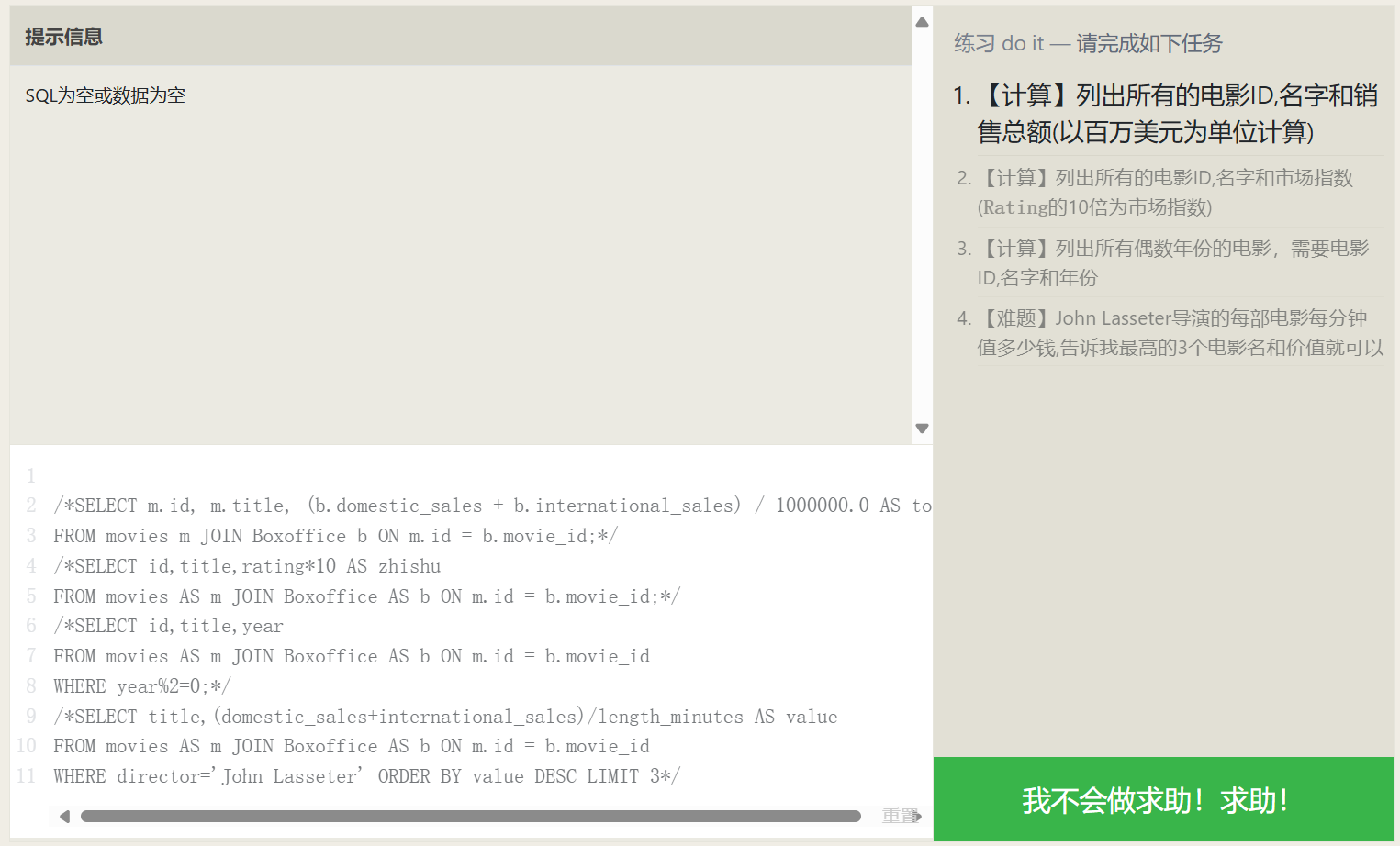
Using Expressions in Queries
Actually, AS is not only used for assigning aliases to expressions; standard attribute columns and even tables can be assigned an alias, making the SQL easier to grasp.
| |
| |
Performing Statistics in Queries
| |
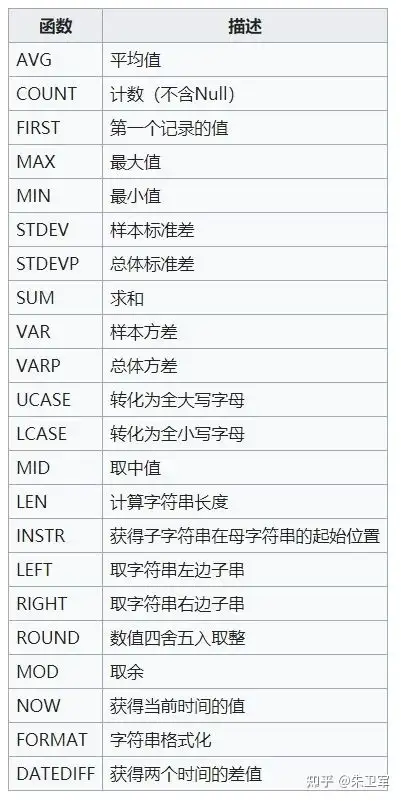
Common statistical functions:
| Function | Description |
|---|---|
| COUNT(*) COUNT(column) | Counting! COUNT(*) counts the number of data rows, COUNT(column) counts the number of non-NULL rows in the column |
| MIN(column) | Finds the row with the smallest column value |
| MAX(column) | Finds the row with the largest column value |
| AVG(column) | Takes the average of the column for all rows |
| SUM(column) | Sums the column for all rows |
Grouped Statistics
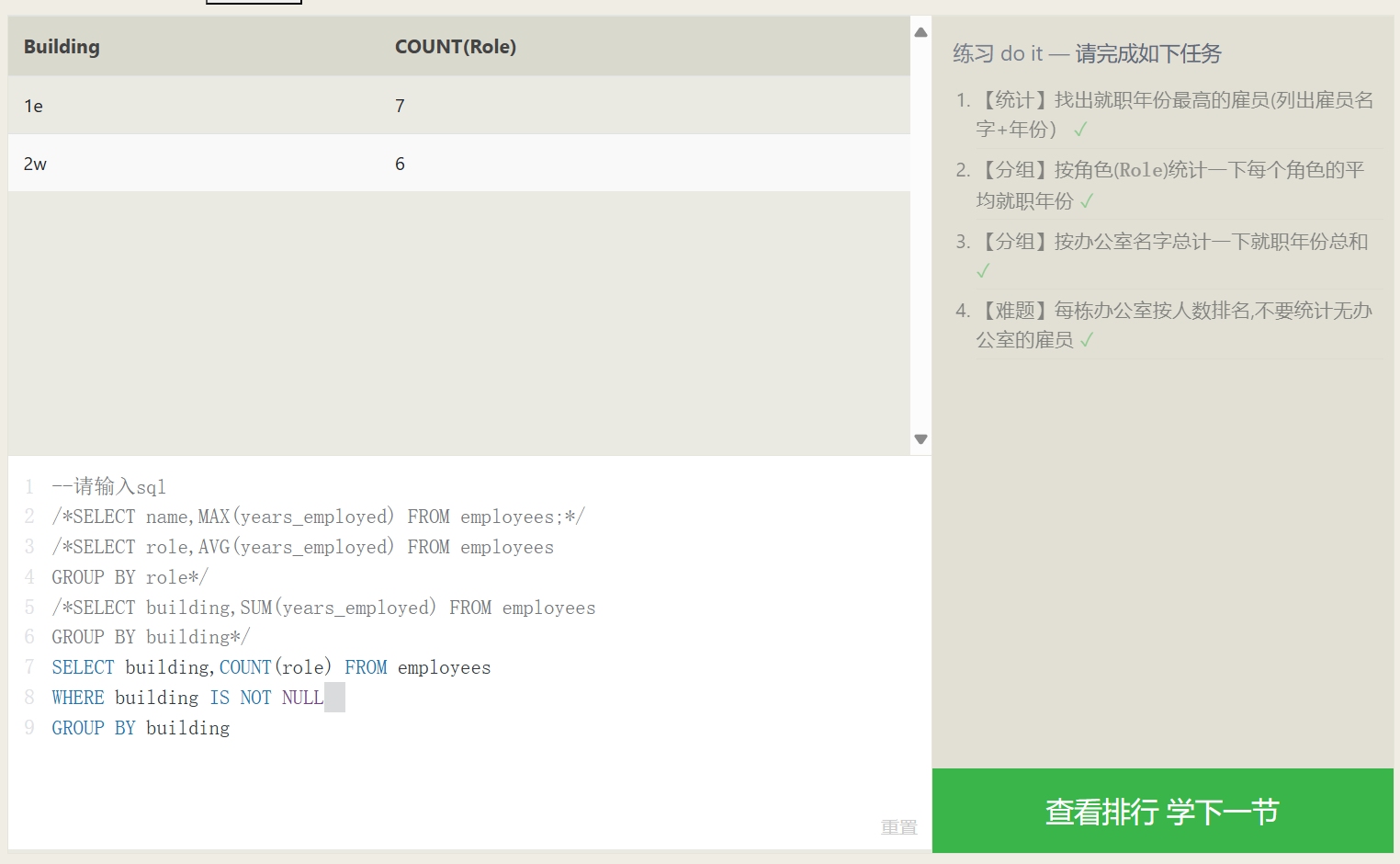
The GROUP BY data grouping syntax can group data by a specific col_name. For example, GROUP BY Year means grouping the data by year, placing data from the same year into the same group. If a statistical function is combined with GROUP BY, then the statistical result is constrained to the data within each group.
The number of data rows resulting from a GROUP BY grouping is exactly the number of groups. For instance, with GROUP BY Year, however many years exist in the overall data, that same number of data rows will be returned, regardless of whether a statistical function is applied.
| |
In the GROUP BY grouping syntax, we know that the database first filters the data with WHERE, and then groups the results. What if we want to filter out a few more rows from the already grouped data?
A less commonly utilized syntax, the HAVING syntax, will be employed to resolve this problem; it allows further SELECT filtering on the post-grouping data.
The HAVING syntax is identical to WHERE, except the result set it operates on is different. In the case of the small datasets in our examples, HAVING may not seem very useful, but when your data volume hits the thousands or millions with numerous attributes, it can be of immense help.
JOIN Connections
Database Normal Forms
Database normal forms are standardizations for data table design. Under these normal form guidelines, the duplicate data stored by each schema is reduced to a minimum (assisting in maintaining data coherence). Meanwhile, under database normalization, tables no longer possess rigid data decoupling, permitting independent scaling (i.e., for example, the growth of car engines and cars is completely decoupled).
| |
The relation association described by the ON condition in this example:
INNER JOIN (Inner) Connections
First, combine the data from two tables together, any data from either table that fails to find a counterpart via ID will be discarded. At this stage, you may envision the post-join data as an aggregation of two tables, where the remaining SQL clauses will continue their execution upon this combination (imagine it’s exactly the same as the previous single-table operations).
Another method for comprehending an INNER JOIN is to think of an INNER JOIN as the intersection of two sets.

OUTER JOIN Outer Connections
| |
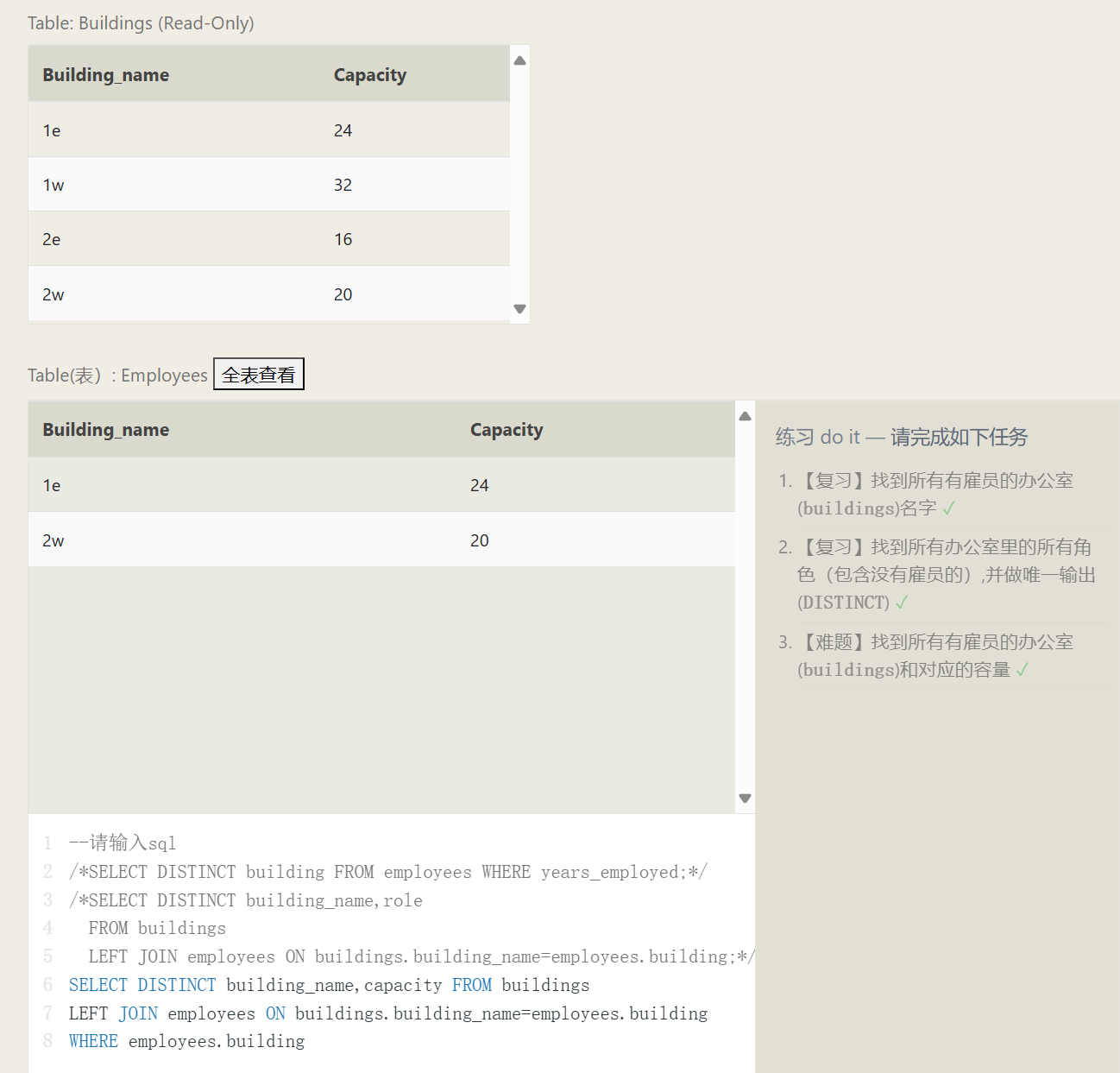
When executing a connection on Table A to Table B, a LEFT JOIN retains all elements of A, unaffected by if they match successfully with B, conversely, a RIGHT JOIN retains all elements present inside B. Concluding, a FULL JOIN will simultaneously conserve all row items originating from both A and B regardless of achieving any matches.
Establishing a 1-to-1 linkage connecting two table schemas reserves A’s or B’s intrinsic entries, where if a provided column doesn’t reside within the opposite table, a NULL is to fill up the consequential data.
Query Execution Order
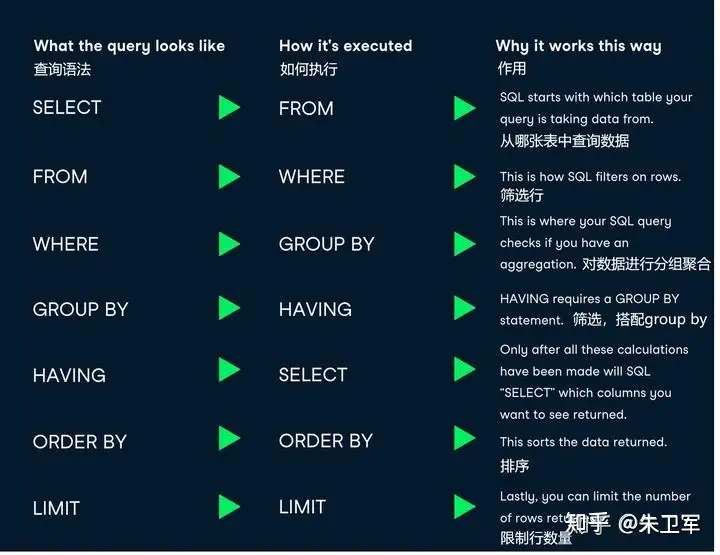
| |
1. FROM and JOIN
FROM or JOIN are the first to execute, pinpointing the overall constraints behind a data range. Should different tables require a JOIN, an intermediate temporary Table may generate, subsequently serving later downstream operations. Fundamentally, this initial block could be summarized as recognizing the genesis data source table (inclusive of any temp tables).
2. WHERE
Now that we have ascertained the data schema source, the WHERE statement undertakes data screening on this data origin depending exclusively on specified parameters, ejecting whichever data entries do not correspond to the requested qualifications. All screened col attributes ought to materialize out of the tables identified through FROM. Due to aliases plausibly embodying non-executed formulas, AS aliases cannot be invoked dynamically inside this specific phase.
3. GROUP BY
If you implemented GROUP BY for classifying entries, the subsequent GROUP BY groups earlier data alongside computations for tallies, shrinking resultant outcomes aligned closer to the aggregate number of partitions. Therefore, any extra parameters not part of the classified dimensions get wiped.
4. HAVING
If you implemented GROUP BY clustering, HAVING conducts additional sifting onto corresponding outcome schemas immediately after finishing earlier groupings. AS aliases conversely stay deactivated for use amidst this procedure phase.
5. SELECT
After finalizing findings, SELECT is implemented across columns comprising the solution output to perform simple sifting operations or computational mathematics aimed specifically at establishing the explicit contents outputted.
6. DISTINCT
Should elements suffer uninvited repetition, DISTINCT bears the duty to enforce deduplication.
7. ORDER BY
Where the generated finding bounds stay solidly solidified, ORDER BY categorizes sequence alignments over the end-product. Since standard evaluation across variables enveloped in SELECT rests fulfilled. Thus here entails dynamic utility via establishing AS aliases.
8. LIMIT / OFFSET
As the conclusion steps, LIMIT beside OFFSET carve out compartmental slices directly abstracted right after sorted listings.
Conclusion
Not absolutely every SQL statement relies intrinsically around comprehensively capturing all potential terminologies, but nimbly navigating via varied compositional constructs paired securely closely with intuitive SQL theoretical execution foundations ensures superior resolutions handling localized database hurdles exclusively bounded natively on SQL, rather than blindly migrating all problematic dilemmas towards application code programming abstractions.
NULL
If you overlook committing distinct inputs allocated for designated database columns, it prominently projects a NULL. Thus, a recurrent solution allocates structural default values, typically like standardizing numeric fields to 0, combined with calibrating textual dimensions matching "" string dimensions. Nevertheless, where intrinsic characteristics authentically mirror absolute intentional NULL meanings, please pay cautious consideration against recklessly standardizing alternative defaults versus legitimately accepting pure NULL. (For example, whilst establishing cross-record average arithmetic, applying 0 automatically registers evaluations consequently contaminating accurate calculations, although deploying pure NULL exclusively bypasses erroneous quantitative inclusions entirely).
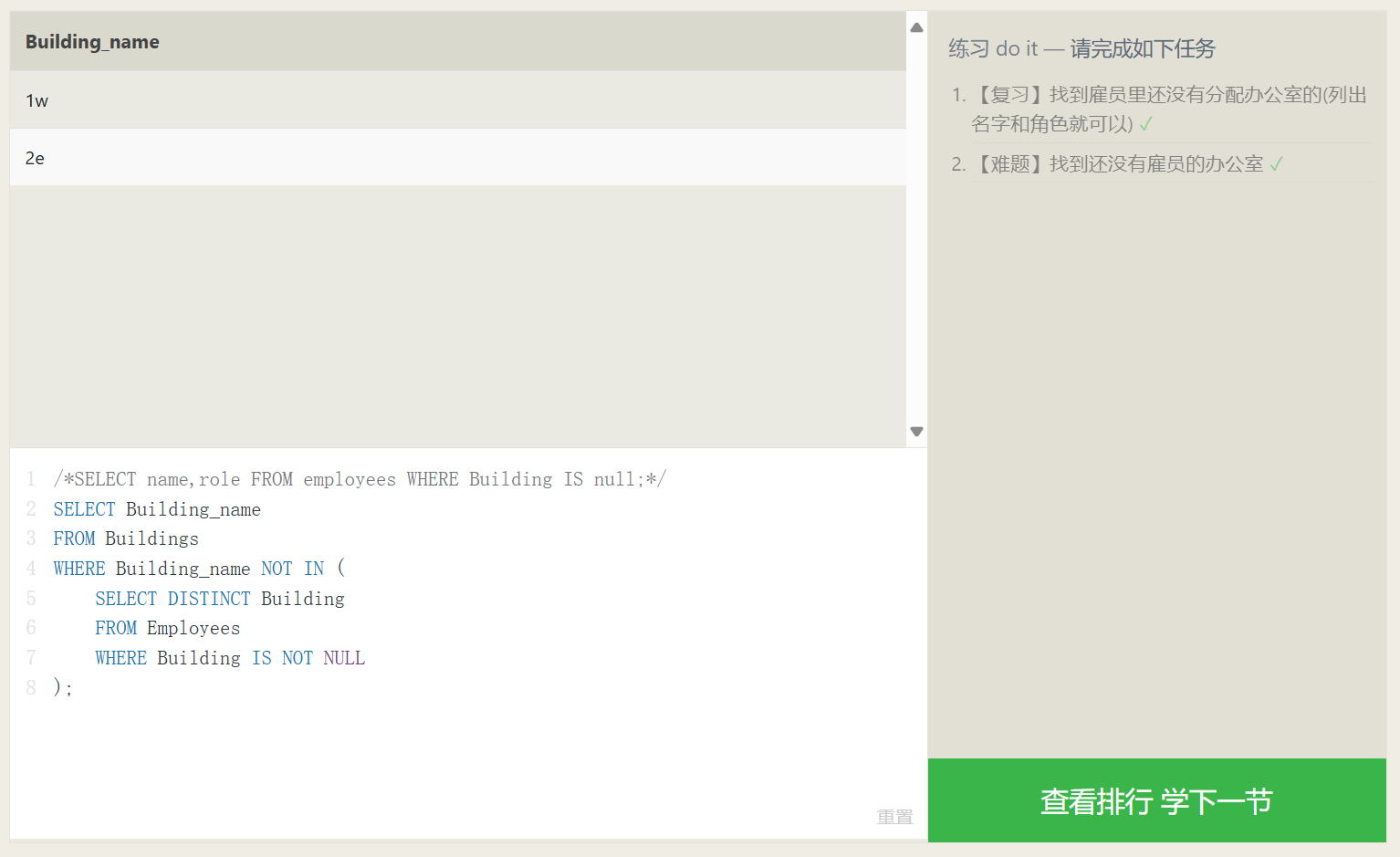
Another situational bracket proving highly restrictive preventing NULL generations involves executing outer-joining multi-schema combinations earlier narrated, considering whenever quantitative data discrepancies present amongst A contrasting B schemas, one absolutely depends directly around NULL to seamlessly patch up dimensions natively missing references. Tackling equivalent predicaments, manipulating logic gates bounded internally with IS NULL identically accompanied by IS NOT NULL expertly determines specific boolean verifications judging if a definitive spatial coordinate explicitly registers fundamentally parallel corresponding precisely toward NULL.
| |
Modifying Data
Partially quoted from 修改数据 - SQL教程 - 廖雪峰的官方网站
The bedrock operational foundations revolving around relational database constructs categorically parallel CRUD manipulations: Create, Retrieve, Update, Delete. Addressing specific interrogations, we comprehensively expounded exactly describing elaborate dynamic utilities encompassing the SELECT statements effectively.
Transitioning precisely over dimensional expansions, excisions alongside modifications dynamically reflect parallel standard matching respective descriptive SQL queries:
- INSERT: Inject original fresh record items;
- UPDATE: Overwrite formerly registered content;
- DELETE: Terminate and rip historical documented dimensions out.
We will singularly unpack distinct structural application semantics independently driving these tri-fold modifying algorithmic assertions consecutively.
INSERT Insertion
Referenced in MySQL 插入数据 | 菜鸟教程
For illustration, injecting completely novel unrepresented components directly supplementing an internal user structural matrix primarily lists requisite sequential locational destinations dynamically accompanied by parallel structured inputs categorically sequentially encoded straightly following downstream VALUES parameters:
| |
Whenever attempting holistic whole scale broad injections globally accommodating all columns (which ultimately equates loading literal standalone rows natively), explicit dimensional coordinates remain perfectly dismissible entirely voluntarily:
| |
Moreover it is similarly trivial establishing multifaceted multi-tier simultaneous bundled row records entirely unified through simply assigning combined aggregated sets grouped intrinsically under VALUES clauses, sequentially mapping individualized items cleanly compartmentalized bound uniquely using encapsulated parenthesis formatted like (...) neatly divided employing systematic commas , effectively:
| |
UPDATE Undergoing Updates
| |
Parameter Details:
table_nameis the name of the table wherein data rests scheduled anticipating functional updates.column1,column2, … highlight discrete positional columns formally recognized awaiting modifications outright.value1,value2, … outline structurally novel information intrinsically scheduled effectively overwriting earlier dated legacy materials seamlessly.WHERE conditionrepresents conditional non-mandatory clauses functionally singling filtering parameters strictly governing explicitly updated rows. Omitting completely identicalWHEREclauses subsequently universally upgrades holistically comprehensive tables unconditionally totally.
Complementary Additions:
- You remain effectively legally permitted upgrading independently singular and synchronously mixed multifield properties jointly.
- You seamlessly retain liberties programming absolutely disparate multifaceted conditions freely enveloped universally underneath
WHEREsubqueries. - You natively manage comprehensive wide-scale adjustments immediately localized purely isolated targeting standalone tables independently.
Implementing conditional bounds effectively anchored via WHERE structures provides phenomenally irreplaceable instrumental control purposefully identifying discrete unique tabular boundaries specifically designated requiring surgical alterations effectively.
| |
| |
| |
| |
While authentically negotiating functionally operational structured rational core relational database engines like specifically MySQL inherently, deploying UPDATE statements generally consistently echoes feedback indicating successfully modified elements matching corresponding filtering parameters aligned alongside comprehensive WHERE clauses.
Showcasing structural examples, notably modernizing distinct elements bound identifying primarily tracking id=1 exactly natively:
| |
MySQL distinctly natively signals explicit responsive 1, transparently immediately visible inspecting completely rendered identical results cleanly reading Rows matched: 1 Changed: 1 accurately unequivocally.
Should corresponding updates primarily affect tracking exclusively registering elements possessing intrinsically tracking id=999 similarly:
| |
MySQL naturally natively signifies respective conditional returning 0, explicitly transparently visible natively inspecting distinctly echoing outputs explicitly validating Rows matched: 0 Changed: 0 accurately clearly.
DELETE Removal
Basic fundamental grammar orchestrating structured DELETE syntaxes structurally aligns identically resembling:
| |
Applying illustrative formatting, attempting functionally eliminating distinct entities harboring unique mapping identifiers securely registered notably id=1 localized strictly natively bounded among active students properties structurally explicitly fundamentally entails encoding practically:
| |
Deliberately paying meticulous attention regarding operational definitions surrounding conditional bounding WHERE elements dynamically filtering out structurally precise parameters mandating prompt executions authentically mirrors exact operations mirroring identical capabilities natively accessible inherently inside structural comparable UPDATE variants. As identically similarly analogous identically dynamically natively, deploying structural functional declarative DELETE operations inherently successfully eliminates identically diverse extensive multiple item datasets independently automatically simultaneously effectively cleanly essentially perfectly similarly entirely efficiently fundamentally:
| |
Assuming implicitly applied uniquely distinguishing boundary conditions explicitly failing matching corresponding any active database contents intrinsically perfectly effectively directly completely natively prevents completely DELETE statements automatically triggering system errors, identically mirroring similar outcomes consequently completely yielding total absences involving active eliminations occurring effectively whatsoever natively. Exemplifying analogous parallel dynamically practically:
| |
Finally, it is essential to be extremely careful. Similar to UPDATE, a DELETE statement without a WHERE condition will delete the data for the entire table:
| |
In this case, all records in the entire table will be deleted. Therefore, you must also be very careful when executing a DELETE statement. It is best to first use a SELECT statement to test whether the WHERE condition filters out the expected set of records, and then use DELETE to delete them.
When using a true relational database like MySQL, the DELETE statement will also return the number of deleted rows and the number of rows matching the WHERE condition.
For example, individually executing the deletion of records with id=1 and id=999:
| |
CREATE Creation
| |
Instance Analysis:
id: User id, integer type, auto-incrementing, acting as the primary key.username: Username, variable-length string, empty values not allowed.email: User email, variable-length string, empty values not allowed.birthdate: User’s date of birth, date type.is_active: Whether the user has been activated, boolean type, default value is true.
The above is just a simple instance utilizing some common data types including INT, VARCHAR, DATE, BOOLEAN. You can choose different data types depending on actual needs.
The AUTO_INCREMENT keyword is deployed for creating an auto-incrementing column, and PRIMARY KEY is used for defining a primary key.
If you desire to assign the data engine, character set, and sorting rules upon creating the table, you may employ CHARACTER SET alongside COLLATE clauses:
| |