This post covers the learning of basic PyTorch usage, primarily based on Bilibili Xiaotudui’s https://www.bilibili.com/video/BV1hE411t7RN/ and with the help of Gemini. In addition to practical applications, it also includes the principles of some deep learning models.
Dataset
An abstract class representing a Dataset.
All datasets that represent a map from keys to data samples should subclass it. All subclasses should overwrite __getitem__, supporting fetching a data sample for a given key. Subclasses could also optionally overwrite __len__, which is expected to return the size of the dataset by many ~torch.utils.data.Sampler implementations and the default options of ~torch.utils.data.DataLoader. Subclasses could also optionally implement __getitems__, for speedup batched samples loading. This method accepts list of indices of samples of batch and returns list of samples.
note
~torch.utils.data.DataLoaderby default constructs an index sampler that yields integral indices. To make it work with a map-style dataset with non-integral indices/keys, a custom sampler must be provided.
An abstract class representing a dataset.
All datasets that represent a map from keys to data samples should subclass it. All subclasses should overwrite
__getitem__, supporting fetching a data sample for a given key. Subclasses could also optionally overwrite__len__, which is expected to return the size of the dataset by many~torch.utils.data.Samplerimplementations and the default options of~torch.utils.data.DataLoader. Subclasses could also optionally implement__getitems__, for speedup batched samples loading. This method accepts list of indices of samples of batch and returns list of samples.Note
By default,
~torch.utils.data.DataLoaderconstructs an index sampler that yields integral indices. To make it work with a map-style dataset with non-integral indices/keys, a custom sampler must be provided.
Custom Dataset
So in actual usage, suppose there is a dataset (let’s use the previously used fer2013 as an example):
First, define a data class inheriting from
Dataset, and define__init__()1 2 3 4 5 6 7 8from torch.utils.data import Dataset import os class MyData(Dataset): def __init__(self, root_dir, label_dir): self.root_dir = root_dir # E.g., fer2013/test self.label_dir = label_dir # E.g., angry self.path = os.path.join(self.root_dir, self.label_dir) # Path merging function, solves cross-system file path issues self.img_path = os.listdir(self.path) # E.g., the string list of all image names under the angry folderOverride
__getitem()1 2 3 4 5 6def __getitem__(self, index): img_name = self.img_path[index] img_item_path = os.path.join(self.root_dir, self.label_dir, img_name) # Concatenate the specific path for a certain image img = Image.open(img_item_path) label = self.label_dir return img, label # Return an object (image) from the dataset and its typeOverride
__len()__1 2def __len__(self): return len(self.img_path)Definition Example
1 2 3root_dir = "fer2013/train" angry_label_dir = "angry" angry_dataset = MyData(root_dir, angry_label_dir)Merging Datasets
1 2 3 4disguest_label_dir = "disguest" disgust_dataset = MyData(root_dir, disguest_label_dir) train_dataset = angry_dataset + disgust_dataset # '+'
TensorBoard
SummaryWriter
- Create a log directory
- Initialize the
Writerobject - Generate event files
- This file is the real database (events.out……). When
writer.add_scalaris subsequently called, the data is not drawn directly on the screen, but appended to this file. - Once you finish executing the corresponding code and run
tensorboard --logdir=logs, TensorBoard’s backend server reads the contents of this file and renders it into charts in the browser.
- This file is the real database (events.out……). When
| |
Note that you can use a different folder to record data for each experiment. For instance, writer = SummaryWriter("logs/lr0.01_batch32"), and after modifying the learning rate, writer = SummaryWriter("logs/lr0.001_batch32").
add_scalar()
- Drawing function
add_scalar()
| |
add_image()
- Image viewing function
add_image()
| |
Pay attention to the type requirements for the parameters: img_tensor (torch.Tensor, numpy.ndarray, or string/blobname): Image data, so images of PIL type need to be converted, for instance using numpy. Also mind the data shape requirements: Tensor with :math:(1, H, W), :math:(H, W), :math:(H, W, 3) is also suitable as long as corresponding dataformats argument is passed, e.g. CHW, HWC, HW. Meaning three image data formats where the order of number of channels, height, and width differ.
| |
add_graph()
Common Transforms
The following are mostly image processing methods.
ToTensor
Convert a PIL Image or ndarray to tensor and scale the values accordingly.
This transform does not support torchscript.
Converts a PIL Image or numpy.ndarray (H x W x C) in the range [0, 255] to a torch.FloatTensor of shape (C x H x W) in the range [0.0, 1.0] if the PIL Image belongs to one of the modes (L, LA, P, I, F, RGB, YCbCr, RGBA, CMYK, 1) or if the numpy.ndarray has dtype = np.uint8
In the other cases, tensors are returned without scaling.
note
Because the input image is scaled to [0.0, 1.0], this transformation should not be used when transforming target image masks. See the [references](vscode-file://vscode-app/d:/Microsoft VS Code/resources/app/out/vs/code/electron-browser/workbench/workbench.html) for implementing the transforms for image masks.
Convert PIL images to torch type, such as
torch.Size([1, 48, 48])
| |
Normalize
Normalize a tensor image with mean and standard deviation.
This transform does not support PIL Image.
Given mean: (mean[1],...,mean[n]) and std: (std[1],..,std[n]) for n
channels, this transform will normalize each channel of the input
torch.*Tensor i.e.,
output[channel] = (input[channel] - mean[channel]) / std[channel]
note:
This transform acts out of place, i.e., it does not mutate the input tensor.
Args:
mean (sequence): Sequence of means for each channel.
std (sequence): Sequence of standard deviations for each channel.
inplace(bool,optional): Bool to make this operation in-place.
- The mathematical principle of
Normalizeis:
- The parameter
meanaffects the “center position”. AfterToTensor, pixels range from $[0, 1]$, centered around $0.5$. Ifmean = 0.5, subtracting $0.5$ shifts the data center to $0$. The original range of $[0, 1]$ becomes $[-0.5, 0.5]$. - The parameter
stdaffects the “scaling magnitude”. E.g.,std = 0.5means dividing the data range by $0.5$, making the final range $[-1, 1]$ from $[-0.5, 0.5]$.
Resize
Resize the input image to the given size.
If the image is torch Tensor, it is expected
to have […, H, W] shape, where … means a maximum of two leading dimensions
Args:
size (sequence or int): Desired output size. If size is a sequence like
(h, w), output size will be matched to this. If size is an int,
smaller edge of the image will be matched to this number.
i.e, if height > width, then image will be rescaled to
(size * height / width, size).
resize()supports both PIL and Tensor image formats. If it’s a Tensor, the expected shape is[..., H, W]. The...here indicates it can handle[C, H, W](single image) or[B, C, H, W](a Batch of images).- The parameter
sizeneeds to be written as a sequence, likeresize((512, 512)). If only one parameter is input, likeresize(512), the image’s shorter edge becomes 512, while the longer edge scales proportionally.
| |
Compose
Composes several transforms together. This transform does not support torchscript.
Please, see the note below.
Args:
transforms (list of Transform objects): list of transforms to compose.
- The
Compose()operation is a pipeline class for varioustransformsoperations. - In deep learning, images usually go through a fixed series of steps (e.g., resizing -> converting to Tensor -> normalizing). If
Composeisn’t used, you have to manually call multiple functions for every image, making the code highly redundant. - The argument type for
Compose()is a list, and the operations fire sequentially, so the data type output by the previous operation must be acceptable as input for the next.
| |
PyTorch Dataset Usage
For instance, to import a dataset for computer vision learning, we can directly download the dataset within the program.
| |
- The
rootparameter indicates where the dataset is stored,trainspecifies whether the dataset is for training, anddownloadindicates whether to download it locally (it generates a download link). - Specific parameter configurations may differ for each dataset…
- If the dataset has already been downloaded locally, it can be copied into the project’s dataset directory, saving download time upon running.
| |
DataLoader
Data loader combines a dataset and a sampler, and provides an iterable over the given dataset.
The :class:~torch.utils.data.DataLoader supports both map-style and
iterable-style datasets with single- or multi-process loading, customizing
loading order and optional automatic batching (collation) and memory pinning.
When training a model, a massive volume of data from the dataset cannot be crammed into memory all at once. DataLoader achieves:
- Batching: Packages images into groups (Batches).
- Shuffling: Shuffles data randomly at the start of every training epoch, ensuring the model prevents rote memorization of the data’s ordering.
- Parallel Computing: Leverages multi-core CPUs to pre-prepare proceeding batches of data, letting GPUs avoid idle time waiting.
| Parameter | Common Values | Description |
|---|---|---|
| dataset | Custom Dataset | Required. Tells DataLoader which “warehouse” to fetch data from. |
| batch_size | 16, 32, 64… | Number of samples loaded per batch. The larger it is, the faster the training, but it consumes more VRAM. In FER emotion recognition, 32 or 64 are common values. |
| shuffle | True / False | Whether to shuffle the order. Training sets are usually set to True (adding randomness); test sets are usually set to False. |
| num_workers | 0, 2, 4, 8… | Multi-process loading. 0 means only the main process is used (slow). Increasing the value speeds up read times. Recommendation: Set to half of your CPU cores. |
| drop_last | True / False | Drop the last incomplete batch. E.g., if there are 100 images and batch_size=32. The remaining 4 images aren’t enough for a batch. Setting this to True discards these 4, ensuring each Batch size is consistent. |
| pin_memory | True | Page-locked memory. If training on a GPU, setting to True accelerates data transfer speeds from RAM to VRAM. |
- For example, we use
DataLoaderto process data from CIFAR10.
| |
- Combining loops and
tensorboard, output images used in eachsteparrayed across everyepoch. - In the code below,
step + epoch * len(test_loader)utilizes a global step size, but alternative setups skipping this to treat eachepochidentically completely as distinct grouped iterations behave comparably similarly.
| |
nn.Module
Base class for all neural network modules.
Your models should also subclass this class.
Modules can also contain other Modules, allowing to nest them in a tree structure.
- In PyTorch, whether it’s a simple linear layer or a complex VGG16 or Transformer, they are all essentially an
nn.Module. It is the base class for all neural network modules. nn.Modulesupports nesting. When you callmodel.to("cuda")on a large model, PyTorch automatically traverses this “tree” and moves all its sub-layers to the GPU.- As long as you assign a layer to
self.xxxin__init__, PyTorch will automatically identify its Weights and Bias and add them to the list of parameters to be optimized.
When writing a subclass of nn.Module, you must override __init__() and forward().
__init(self)__- Define network layers here (convolution, pooling, fully connected, etc.).
- You must call
super().__init__(). This line initializes the parent class’s properties; without it, PyTorch won’t be able to automatically track the defined layers, and the model won’t train.
forward(self, x)- Defines the flow of data. Specifies which layers an image passes through sequentially.
- You do not need to manually call
forward. Simply runmodel(input), and PyTorch will automatically triggerforward.
| |
Convolution Conv
$$ \text{out}(N_i, C_{\text{out}_j}) = \text{bias}(C_{\text{out}_j}) + \sum_{k = 0}^{C_{\text{in}} - 1} \text{weight}(C_{\text{out}_j}, k) \star \text{input}(N_i, k) $$- Convolution animation page: conv_arithmetic/README.md at master · vdumoulin/conv_arithmetic
| Parameter | Meaning | Function |
|---|---|---|
| in_channels | Input Channels | Usually 3 (RGB) for color images, and 1 for grayscale images. |
| out_channels | Output Channels | Number of convolution kernels. The number of kernels determines the number of layers in the output feature map. |
| kernel_size | Kernel Size | The size of the “window” used to extract features. Commonly 3 or 5 (VGG usually defaults to 3). |
| stride | Stride | The span at which the window slides. Defaults to 1. The larger the stride, the smaller the output image. |
| padding | Padding | Pads with 0s around the image. 'same' keeps the size unchanged, while 'valid' applies no padding. |
| dilation | Dilated Convolution | The spacing between points in the convolution kernel. Used to increase the receptive field (without increasing the number of parameters). |
| bias | Bias | Whether to add a constant offset to the result. Enabled by default. |
- The Padding parameter of convolution is very important. If zeros are not padded around it, the convolution will cause the image size to become smaller and smaller.
- Shape calculation formula:
$W_{out}$ calculations follow a similar approach.
| |
| |
(Max) Pooling MaxPool
- The logic of max pooling is extremely simple: within a window range (Kernel), only the largest value is kept, and the rest are discarded.
- It preserves input features while simultaneously reducing data volume, speeding up training.
| Parameter | Unique Features |
|---|---|
| kernel_size | Window size. Typically 2 (meaning merging a $2 \times 2$ region). |
| stride | Default value equals kernel_size! This differs from convolution. If kernel_size=2, the stride defaults to 2, so the windows do not overlap. |
| ceil_mode | Very important. The default is False (floor). If set to True (ceiling), when the window exceeds boundaries, as long as there is data in the window, the result will be retained instead of discarded. |
| padding | Padding. Note that pooling pads with negative infinity ($-\infty$), ensuring padded spots are not selected as the maximum value. |
| |
| |
Loss Functions and Backpropagation
- The loss function is used to calculate the gap between the actual output and the target, providing a basis for backpropagation and parameter updates. In classification tasks, the cross-entropy function is commonly used to calculate the error.
| |
Optimizer
torch.optim — PyTorch 2.10 documentation
- Example code:
| |
PyTorch in Practice: CIFAR10
- A practical example of a simple classification model targeting the CIFAR10 image dataset.
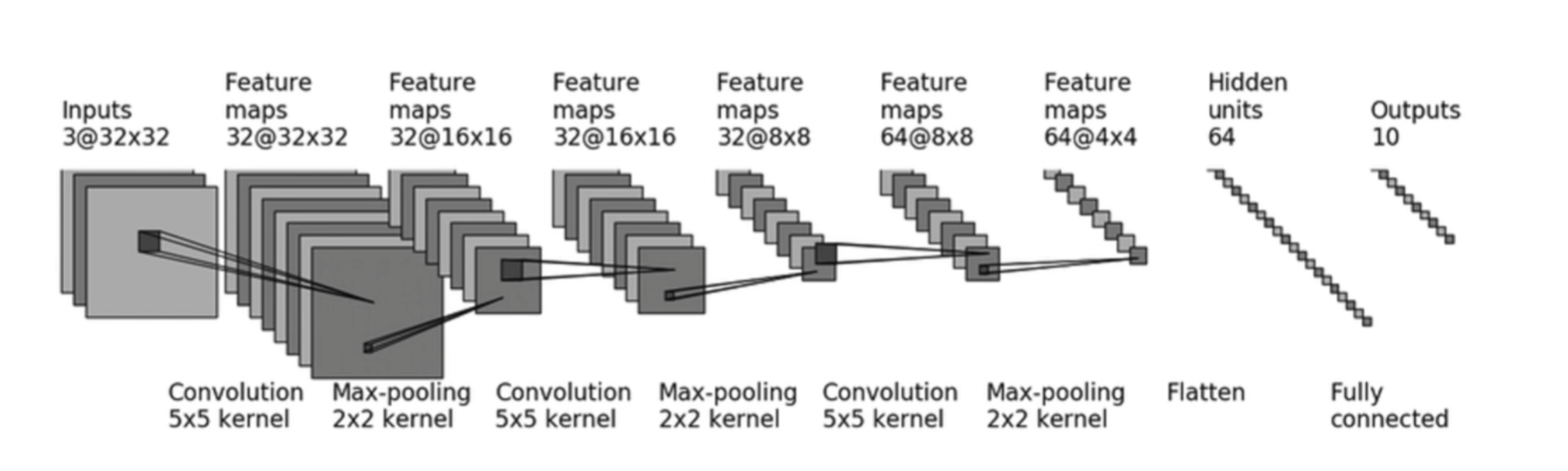
- First, let’s understand
Sequential.nn.Sequentialis a special subclass ofnn.Modulewhose purpose is to automatically execute theforwardlogic. Note: each parameter inside is a class for a certain layer, meaning they must be comma-separated.Sequentialsimplifies both the model definition and theforward()operation.
| |
Before building the model, initially set up
DataLoaderto handle the dataset.- Prepare
train_dataandtest_dataindependently respectively.
- Prepare
| |
- After building out the model properly, run a trivial check testing evaluating exactly asserting checking whether output dimension correctly matches expectation guidelines appropriately cleanly.
| |
- Basic settings before training
- Define
TensorBoardwriter - Setup
deviceto call the graphics card for accelerated training - Instantiate the training model
- Define the loss function
- Set up the optimizer
- Define
| |
- Training section
- Boilerplate code for the optimizer
- Record training loss
| |
- Evaluation section
- Execute once per epoch
with torch.no_grad(): Turn off gradient recording- Compile performance metrics
| |
- Visualization
| |